s1ft does not score how you spoke. It records measurements: a timestamped transcript and pitch and level frames for your own voice. The skills work out pauses, pace, and uptalk from those frames and the transcript. A review turns those measurements into notes. Two agent skills write that review for you: review-my-delivery for one meeting, and weekly-trends for how your speaking changes over weeks.
The skills run in your own AI agent, such as Claude Code or Codex. They read the meeting files on your Mac through the s1ft command. The agent you choose, and its provider, see what the agent reads. To set up an agent, see Connect AI agents.
What you need
- S1ft 1.3 or later, and at least one recorded meeting. See Getting Started with s1ft.
- An agent with the s1ft skills installed. The install steps are on the Connect AI agents page. The
s1ftbase skill and the library skills come together in the Claude Code plugin. - A meeting that has voice data. Voice data exists only for your own voice. If a meeting has none,
review-my-deliverysays so and reviews the transcript only.
Review one meeting
review-my-delivery gives you an evidence-based look at how you spoke in one meeting. Ask your agent to run it. For example:
Use the review-my-delivery skill on my last s1ft meeting.If you don’t name a meeting, the skill takes the newest one. With the Claude Code plugin, you can also run it as /s1ft:review-my-delivery.
The skill measures five things, using only your own speech:
- Pauses — silences per minute and the share of time in silence.
- Pace — words per minute, as a median and a range.
- Uptalk — statements that end on a rising pitch.
- Fillers — a count and a rate per minute, by word.
- Interruptions — how often you spoke over someone, and how often someone spoke over you.
It then writes a short review in four parts: what stood out in this meeting, what went well, one thing to try next time, and the limits of the data.
The review describes and does not judge. It gives no scores, grades, or labels about you, and no ideal numbers as a pass mark. It also checks the kind of meeting first. For a standup, you get the numbers and no tip. And if the sample is small (less than about 2 minutes of your speech, or fewer than 5 of your segments), it gives you the numbers and stops, because that is too little for patterns.
See changes over weeks
weekly-trends compares your speaking numbers week by week. By default it looks at the last 4 full weeks and the current week so far.
Ask your agent:
Use the weekly-trends skill on my s1ft meetings.The report has a table with one row per week and one column per measure. A week with fewer than 3 meetings, or fewer than about 10 minutes of your speech, is marked as thin, and the skill draws no trend from it. With fewer than 3 usable weeks, it tells you there is not enough data yet. It names only changes that are clear, offers possible reasons as questions, and ends with one thing to keep or try.
One meeting is one sample. For patterns, use weekly-trends and not a single review.
Make a skill fit you
Each skill is a plain text file. You can copy it and change the parts that its Adapt this skill section lists. For review-my-delivery these are the measures to keep, your own filler-word list in your language, the silence thresholds, which kinds of meetings to review, tone and length, and where the agent saves each review. For weekly-trends they also include the period and which meetings to count. See Choose a library skill and adapt it.
To get a review after each meeting without asking, see Run a skill automatically.
Use your voice numbers in the in-app summary
The summary that s1ft writes after each meeting can use your voice numbers too. The default Summary skill does not send them. You switch them on yourself.
- Open the s1ft menu bar popup and press Cmd + , to open Settings.
- Click the AI Engine tab.
- In the Post-meeting summary section, click Edit on the Summary entry.
- Under Uses, check My voice numbers.
- Add your own request to the instructions, for example a note about the points you want reviewed.
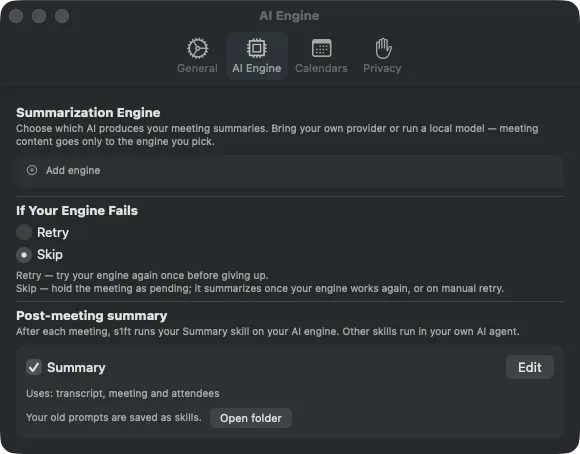
s1ft saves as you type, and the new setting applies to the next summary. For a new meeting, the engine then receives the pitch range, level, and silences of your own voice for each span, along with the other data you checked. The result is saved as summary.md in the meeting folder, as for any summary. The agent skills above give a fuller review, because they read the voice numbers and the transcript directly and follow a fixed method.
The editor also has a preview. It runs the instructions against a sample meeting and its Context sent tab shows the exact data the engine receives. See AI Engine Setup for the editor, the Uses boxes, and the preview.
If you used the old prompts
Earlier versions of s1ft kept several prompts, and this page gave a delivery-review prompt to paste into them. Newer versions have one in-app skill, Summary, and no list of prompts. The first time you start a newer version, s1ft moves your prompts:
- Your active prompt becomes the Summary skill.
- Your other prompts are saved as skills in
skills/imported/<slug>/, inside~/Library/Application Support/s1ft/skills/. Click Open folder in the Summary entry to see them in Finder.
The imported skills declare Transcript and Meeting and attendees as their data, and not My voice numbers. s1ft itself runs only the Summary skill. If you pasted the old delivery-review prompt, use review-my-delivery instead. It does the same job and reads your voice data. For more on the move, see Your old prompts.
What’s next
- Connect AI agents — Install the s1ft skills and run them in your agent.
- AI Engine Setup — Connect an engine and edit the Summary.
- Settings reference — Every tab in Settings, explained.
- Meeting data files — What
telemetry.jsonand the other files hold.