Meeting notes without a bot in the call.

Every transcript stays on your Mac. Ready-made skills let Claude, Codex or Cursor work with every meeting. $19 once, no subscription.

s1ft is a menu bar app that records the call from your Mac, so no bot has to join. It transcribes on-device and writes plain files into a folder you own. No account.

macOS 14.2+ · 14-day full trial, no card

See s1ft in 60 seconds 1:01
0servers in the meeting pipeline
0bots in your call
3files per meeting
$19once, for life
01

Your data stays with you, and your tools can read it.

Most meeting assistants keep your recordings on their servers and show them back to you in their app. s1ft writes files.

1 meeting.json Name, time, attendees and calendar events. always · on-device
2 transcript.json Speaker-labelled segments with start times, your lines marked "Me". always · on-device
3 telemetry.json Pitch and level frames for your voice. Pace, pauses and uptalk are worked out from them. Your mic only; other people are never measured. always · on-device
4 summary.md optional your engine · local model or API key
~/Documents/s1ft Meetings/
├── 2026-10-06-10-00_Weekly sync/  ← named from your calendar
│   ├── meeting.json
│   ├── transcript.json
│   ├── telemetry.json
│   └── summary.md
├── 2026-10-07-15-00_zoom.us/      ← no calendar match
│   ├── meeting.json
│   ├── transcript.json
│   └── telemetry.json
└── 2026-10-08-14-00_Architecture review/
    ├── meeting.json
    ├── transcript.json
    ├── telemetry.json
    └── summary.md

Any app that opens a folder can read these files. File formats

No third-party processorNo DPA to sign, no vendor in your GDPR records. You are the only controller.
Audio never leaves the MacTranscription and voice measurement run locally. Audio stays on your Mac and is deleted after the retention period you choose (default 7 days).
Only text goes to an engineAnd only to the one you configured, under your own agreement with that provider.
Consent is simplerNo visible bot means you tell people yourself. Templates ship with the app.
Calendar stays on your Macs1ft reads event titles and times through macOS Calendar. No calendar login, no calendar password stored.
02

Skills: your AI agent does the work after the call.

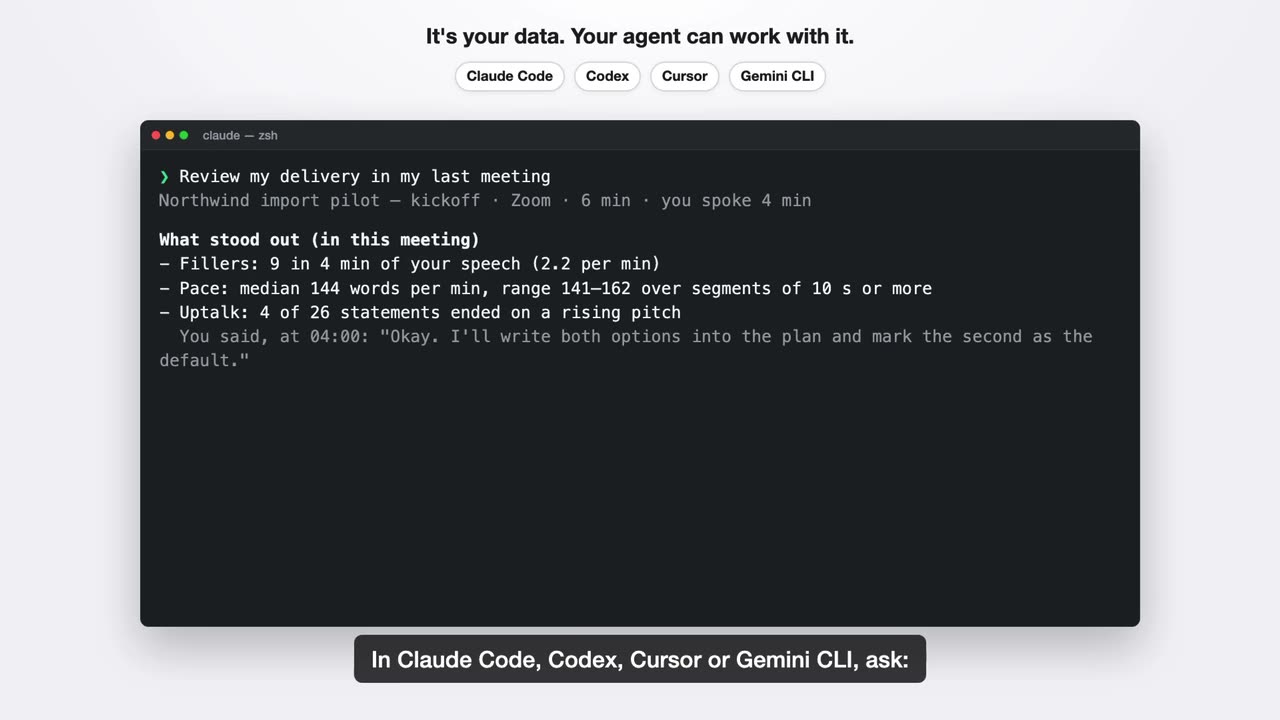
Install the s1ft skills in Claude Code, Claude Desktop, Codex, Cursor or Gemini CLI. Ask in plain words. The agent reads your meeting folder on your Mac.

The learner

You speak English at work as a second language, and you want proof of how you sound, not opinions.

You type Review my delivery in my last meeting.

Example
What stood out (in this meeting)
- Fillers: 9 in 12 min of your speech (0.75 per min)
- Pace: median 148 words per min, segments of 10 s or more
- Uptalk: 4 of 21 statements ended on a rising pitch
You said, at 03:12: "So we could maybe ship on Friday?"
What went well: your pace stayed steady. It moved less than 10 words per min between the first and the last part of the meeting.
One thing to try: your answers started after 0.4 s on average. If it feels natural, try a short pause before you answer.
Limits: one meeting is one sample. The data cannot tell why your pitch rose.

review-my-delivery weekly-trends

What s1ft measures

The manager

You have many meetings each week and need the decisions and the tasks without replaying them.

You type List the decisions of my last meeting, and the action items.

Example
Decision: Ship the import fix on Friday.
Why: Support has three open tickets about it.
Owner: Me
When: 04:12, 2026-10-12
Quote: "OK, so we ship the fix on Friday."

[ ] Me: send the plan to the client (due 2026-10-16) [05:40]

decision-log action-items summary

The client-facing person

You are a consultant, a sales person or a freelancer. The app runs summary after each meeting. A script of yours can run follow-up-email after each client call.

You type Write a follow-up email for my last client call.

Example
To: Jo Client <[email protected]>
Subject: Follow-up: Kickoff call

Hi Jo,
Thank you for your time today.
- We agreed to start with the import pilot.
- Next step: I send the plan (due Friday). You confirm the contact for access (to confirm).
Best regards

Draft only. The skill sends nothing.
Meeting type: client call (confidence: high). Signals: one external domain, price and schedule talk.

follow-up-email meeting-type

Run a skill automatically

Your story

Your work is not on this list? Copy a skill and change its "Adapt this skill" part. Or write a new skill.

Example
## Adapt this skill

Change these parts to fit you:

- **Entry fields.** Add "Impact" or "Risk"; remove "Quote".
- **Where the log goes.** A file path, for example a markdown file per project that the agent appends to.
- **Output format.** A table, a list, or a format your wiki accepts.

decision-log

Write your own skill Community skills

Paste this line into your agent

Install the s1ft skills from https://github.com/s1ft-app/skills

The skills need S1ft 1.3 or later.

03

Your voice, measured.

s1ft records the pitch and level of your own voice on every call, next to the words. It measures on your Mac, from your microphone only. It never measures other people.

Example

What a transcript sees

Me, 18:40: So the inference budget, we're looking at roughly thirty-five K a month, and it scales with usage.

What s1ft also measures

Me, 18:40: So the inference budget, 0.2 s pause we're looking at roughly thirty-five K a month, and it scales with usage.

  • pace 182 wpm, the fastest stretch in this meeting
  • pitch falls ↘ through "scales with usage"
162words per minute, whole meeting
182wpm peak, at 18:40
7rising-tone sentence endings
9fillers in 31 minutes

Example numbers. The app stores the pitch and level of your microphone; skills work out pace and rising tones from those frames.

Skills turn this into feedback, after one meeting or over many weeks. The learner story · weekly-trends · How to read the numbers

04

Summaries with an engine you pick.

The app runs the in-app Summary with an engine you pick: Ollama, LM Studio, Anthropic, or OpenAI or compatible.

Setup

Ready in five minutes. Two steps are optional.

  1. InstallOpen the DMG, drag to Applications. s1ft lives in the menu bar.required
  2. Allow microphone and system audiomacOS asks once. Without both, s1ft cannot hear you or the call.required
  3. Turn on your calendarsGrant Calendar access once, then switch on the accounts macOS Calendar already has. No login inside s1ft. Meetings get their real names instead of the app name plus a timestamp.recommended
  4. Pick an engineOllama, LM Studio, or your own API key. Skip it and you still get the transcript and the voice data.optional
05

Against a typical meeting bot.

Where the recording lives decides everything else.

s1ftTypical cloud assistant
Where the audio goesStays on your Mac; deleted on the schedule you chooseUploaded to the vendor
Who sees the callNobody new. No bot in the attendee listA bot joins, visible to everyone
Where the notes liveFiles in your Documents folderThe vendor's app and database
Which model reads themThe one you pick: local or your keyThe vendor's, under the vendor's terms
Voice measurementPitch and level of your voice, yours onlyRarely; usually talk-time only
GDPR positionNo processor. You are the controllerVendor is a processor; DPA needed
Price$19 onceA monthly subscription
$19

Once. For life. Every future version.

Start with a 14-day trial that holds nothing back. No card, no account. If you buy and change your mind, full refund within 14 days.

  • Direct download, signed and notarised. Not on the App Store.
  • Engine costs, if any, are between you and your provider. Local is free.