How Your AI Agent Can Make You a Better Communicator
When I started building s1ft, I wanted the kind of feedback my friend used to give me after a call: specific, honest, and close to the moment. A transcript doesn’t give you that. A summary doesn’t either. What helps is someone looking at what you actually said and how you said it, then pointing at one thing.
Now you can have that without a person watching over your shoulder. s1ft is the sensor. The AI agent you already use is the one that reads the readings and talks to you about them. The agent’s side comes from small instruction files called skills. This post walks through how the pieces fit, with a four-week example you can copy.
One note before the example. Every number and chart below is synthetic. The person in the example, the meetings and the data are invented to show what the skills report. They aren’t from a real user.
The sensor and the coach
s1ft records your meetings on your Mac and keeps each one as a folder of plain files: the meeting details, the transcript, and measurements of your microphone. On its own it doesn’t grade you or give advice. In the words of the skill that reads these files, the voice data is “a sensor reading, not a verdict.”
The coaching happens in your own AI agent. You install the s1ft skills, and the agent learns how to read the folders and what to say about them. Four skills do the work in this post:
s1ftis the base skill. It gives the agent access to your meetings and teaches it how to read pauses, pace, uptalk, fillers and interruptions. The other skills build on it.meeting-typereads the signals in a meeting (attendees, speakers, length, title, content) and says what kind of meeting it was, with a confidence level and the evidence.review-my-deliverylooks at how you spoke in one meeting and suggests one thing to try.weekly-trendscompares your weeks, with the numbers behind every statement.
A fifth skill, summary, gives you the bottom line, decisions, open issues and action items of a meeting. It doesn’t measure your delivery, but it’s useful in a different way, which I come back to below. More skills will come later. The ones above ship today.
A four-week example
Meet Dana, an invented product manager who spends most of the week in calls. Dana wants to answer questions with less “so” and “um” at the start. That’s a goal Dana picked, not a rule for everyone. Dana has s1ft 1.3 or later and the skills installed, and has been recording meetings as usual.
Week 1: one meeting, one thing to try
On Friday, Dana asks the agent: “Review my delivery in yesterday’s Northwind call.”
The agent first checks the kind of meeting, because the right advice depends on it. meeting-type reports a client call, high confidence, based on an external email domain among four attendees, a title that says “Northwind”, and a 38-minute length. That matters: review-my-delivery checks the kind of meeting first, because the advice that fits a standup, a one-on-one or a presentation isn’t the same.
Then it reads the transcript and the voice data. Here is the kind of review Dana gets, shortened:
- Fillers: 25 in 14 minutes of Dana’s speech, 1.8 per minute (11 “so”, 8 “um”, 6 “you know”).
- Pace: median 148 words per minute, from about 131 to 166 across segments of 10 seconds or more.
- Pauses: 3.2 silences per minute, 17% of the time in silence. Answers started on average 0.9 seconds after the other person finished.
- Uptalk: 5 of 38 statements ended on a rising pitch (13%).
- Interruptions: Dana started speaking over someone twice, and someone started speaking over Dana three times.
Then the part that matters. The skill asks for four things in a fixed order:
- What stood out. In this meeting, 14 of the 25 fillers came in the first sentence of an answer, for example “So, um, the short version is…” at 12:40.
- What went well. Pace stayed in a steady range: a median of 148 wpm, mostly between 131 and 166.
- One thing to try. “14 of your 25 fillers opened an answer. If it feels natural, try a short pause there instead of ‘so’.”
- Limits. The data can’t say how the call felt, how the client reacted, or whether a pause would suit this audience. It’s one meeting, so it isn’t a pattern.
Notice what’s missing: a score, a grade, or a word like “nervous.” The skill describes and points to evidence. It treats fillers and pauses as normal speech, and it doesn’t present “fewer” as the goal. It also doesn’t comment on anyone else’s delivery, because s1ft has no voice data for other people. More on that below.
Weeks 2 to 4: just keep meeting
Dana changes nothing in the setup. Meetings keep getting recorded. Dana tries the pause when it feels natural, and forgets about it in some calls. That’s fine. Nothing here is a requirement.
Week 5: what changed?
Four weeks later, on Tuesday of the new week, Dana asks: “Show me how my speaking has changed over the last four weeks.”
weekly-trends takes the last four full weeks (Monday to Sunday) and the current week so far. For each week it adds up Dana’s counts and minutes before dividing, so a long meeting counts more than a short one. Here is an excerpt of the table it produces. The skill’s full table has a column for every measure, including pauses and interruptions per hour. I’ve kept the columns this post talks about.
| Week of | Meetings | Dana’s speech | Pace (median) | Uptalk | Fillers per minute |
|---|---|---|---|---|---|
| Sep 14 | 9 | 142 min | 148 wpm | 11% | 1.8 (256) |
| Sep 21 | 8 | 120 min | 152 wpm | 14% | 1.5 (180) |
| Sep 28 | 10 | 160 min | 149 wpm | 12% | 1.3 (208) |
| Oct 5 | 9 | 136 min | 151 wpm | 13% | 1.1 (150) |
| Oct 12 (so far) | 2 (thin) | 7 min | 156 wpm (thin) | 14% (thin) | 1.4 (10), thin |
The raw filler counts sit in brackets next to the rates, because small counts swing widely. The current week has fewer than 3 meetings and about 7 minutes of Dana’s speech, so the skill shows its numbers, marks them thin, and draws no trend from them.
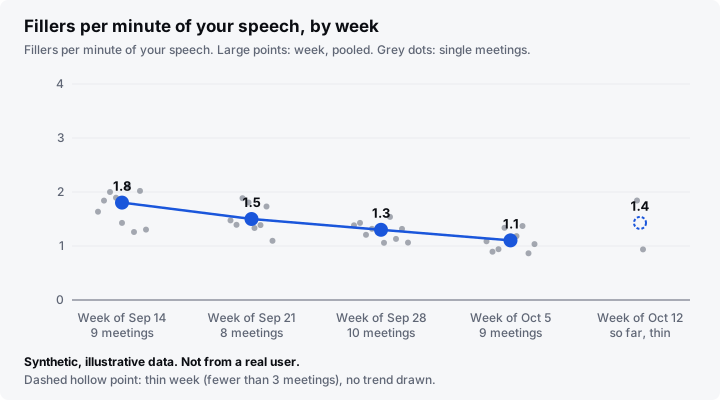
Synthetic, illustrative data. Not from a real user.
Here’s what the agent says about it:
- A clear change. “Your fillers per minute went from 1.8 to 1.1 over four weeks. That is a real change.” The skill says this plainly when a change runs in one direction for at least three weeks and is larger than the usual week-to-week range. It doesn’t hide good news behind caveats.
- No clear change in pace. The weekly median stayed between 148 and 152 words per minute, so the agent says “no clear change.” Uptalk is the same story.
- Possible reasons, as questions. The skill asks instead of claiming a cause: did Dana run more or fewer presentations, or try the pause on purpose? Correlation isn’t cause, and the agent doesn’t say the pause made the difference.
- One thing to keep. Pace sits in a steady range, so the suggestion is to keep it. The skill doesn’t push you to chase a lower or higher number for its own sake.
- Limits. Small samples, different kinds of meeting, one microphone, and no information about how the speech was received.
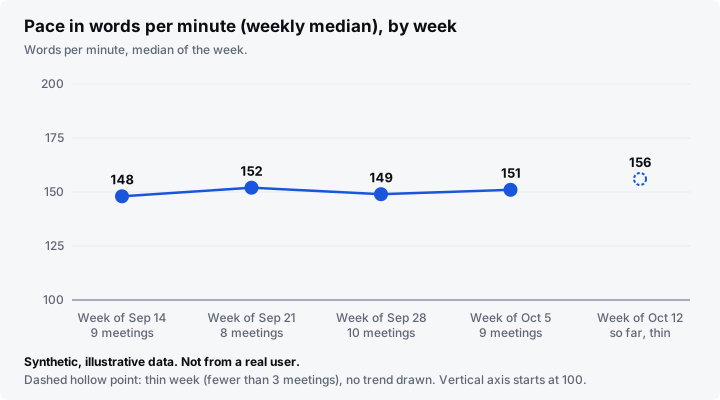
Synthetic, illustrative data. Not from a real user.
If Dana wants to compare like with like, the agent can use meeting-type to split the weeks by kind of meeting. Standups count for volume only, and the skills suggest no changes from them.
The summary is a mirror too
Delivery isn’t only about pauses and fillers. It’s also whether your point arrived. Try this now and then: ask the agent for a summary of a meeting where you made a case, and read the Bottom Line it writes. Does it match what you meant to say?
The summary skill writes the bottom line, decisions, open issues and action items from the transcript and the meeting details, in under 500 words. If it misses your main point, the point may not have been stated clearly, or the transcript may simply be poor. The summary can’t tell you which. Use it as a question to ask yourself, not a measurement. One idea to try: state your key point in a single sentence earlier.
Only your voice is measured
The voice data in s1ft covers only you. The measurements come from your own microphone, and they hold no data about other speakers and no scores. That’s why review-my-delivery says nothing about how other people spoke.
s1ft still separates the voices on the other end of a call, so the transcript can say Participant 1 and Participant 2. Here is what happens to the voice fingerprints it uses for that:
- They stay in memory only while the meeting is being transcribed.
- s1ft never saves them, never sends them, and never uses them again.
For the full policy, see the s1ft privacy page.
Try it
You need S1ft 1.3 or later and an agent that reads Agent Skills, such as Claude Code, Codex or Claude Desktop. The Connect AI agents guide shows how to install the skills, adapt one to your own filler words and focus, and run one automatically after a meeting.
Start with one meeting. Ask the agent to review your delivery, read the one thing it suggests, and see what you notice in the next call. Four weeks later, ask for the trends. That’s the whole loop.